helios
Milestone 2: Scene Graph, Gamepad Widgets, and a Flying Spaceship
Milestone 2 is out. I originally planned to add some camera controls, but ended up rewriting how cameras integrate with the scene graph entirely. Along the way I also built the foundations for the game object system, a bunch of ImGui debug widgets, and a small spaceship demo where you fly around with a gamepad.
Camera Refactor
In milestone_1, Camera inherited from SceneNode. That worked, but it always felt a bit off - a camera is really just a viewpoint, not a scene object. Having cameras inherit all the scene node behavior led to some awkward edge cases.
The new design flips it around: CameraSceneNode now wraps a Camera component. The node participates in the transform hierarchy, the camera handles projection and view logic. Much cleaner separation.
The big win here is component-wise transform inheritance: Say you have a camera following a spaceship - you probably want the camera to track the ship’s position, but not roll when the ship does. With TransformType flags you can now pick exactly what gets inherited:
auto camera = std::make_unique<Camera>();
auto cameraNode = std::make_unique<CameraSceneNode>(std::move(camera));

// Only inherit translation from parent - ignore rotation and scale
cameraNode->setInheritance(TransformType::Translation);

auto* nodePtr = scene->addNode(std::move(cameraNode));
The view matrix now comes from the inverse world transform of the camera node, so all the existing hierarchy logic I had for other nodes just works here too.
Game Objects and Commands
I went back and forth on the concepts of ECS, but decided to keep it simple with plain old OOP/inheritance: I landed on a basic GameObject class with GUID identification and a GameWorld container. Nothing fancy, but it covers what helios needs right now.
The part I like is the CommandBuffer. Instead of having input handlers execute game logic directly, they push commands to a buffer that gets processed once per frame. Same inputs in the same frame always produce the same result, and it opens the door for replays later:
const auto stick = inputSnapshot.gamepadState().left();
float speed      = stick.length();
speed = speed <= helios::math::EPSILON_LENGTH ? 0.0f : speed;

helios::math::vec2f dir = speed > 0.0f
                            ? stick * (1.0f/speed)
                            : helios::math::vec2f{0.0f, 0.0f};

commandBuffer.add(
    guid,
    std::make_unique<
    helios::examples::spaceshipControl::commands::PlayerMoveCommand
    >(dir, speed)
);
Gamepad Config
I’ve been testing with a couple of different controllers: An old Xbox Elite Series 2 pad (whose best days are long gone) and a GameSir G7 (which really deserves all the praise it got in reviews - minus the dpad). The important thing for debugging was that they all behave slightly differently when it comes to stick drift and axis ranges.
So I added GamepadSettings for per-controller deadzone thresholds and axis inversion. The deadzones use a radial strategy, which gets rid of that annoying diagonal drift you get with cheap analog sticks. The GamepadWidget exposes all of this at runtime with sliders and toggles, which beats recompiling every time I want to try a different threshold.
Units
This is one of those things I should have done from the start: helios now has a proper units system. One helios unit equals one meter, time is measured in seconds. There are conversion helpers for when you need centimeters or milliseconds:
using namespace helios::core::units;

float distance = from(50.0, helios::core::units::Unit::Centimeter);  // 0.5
Spaceship Demo
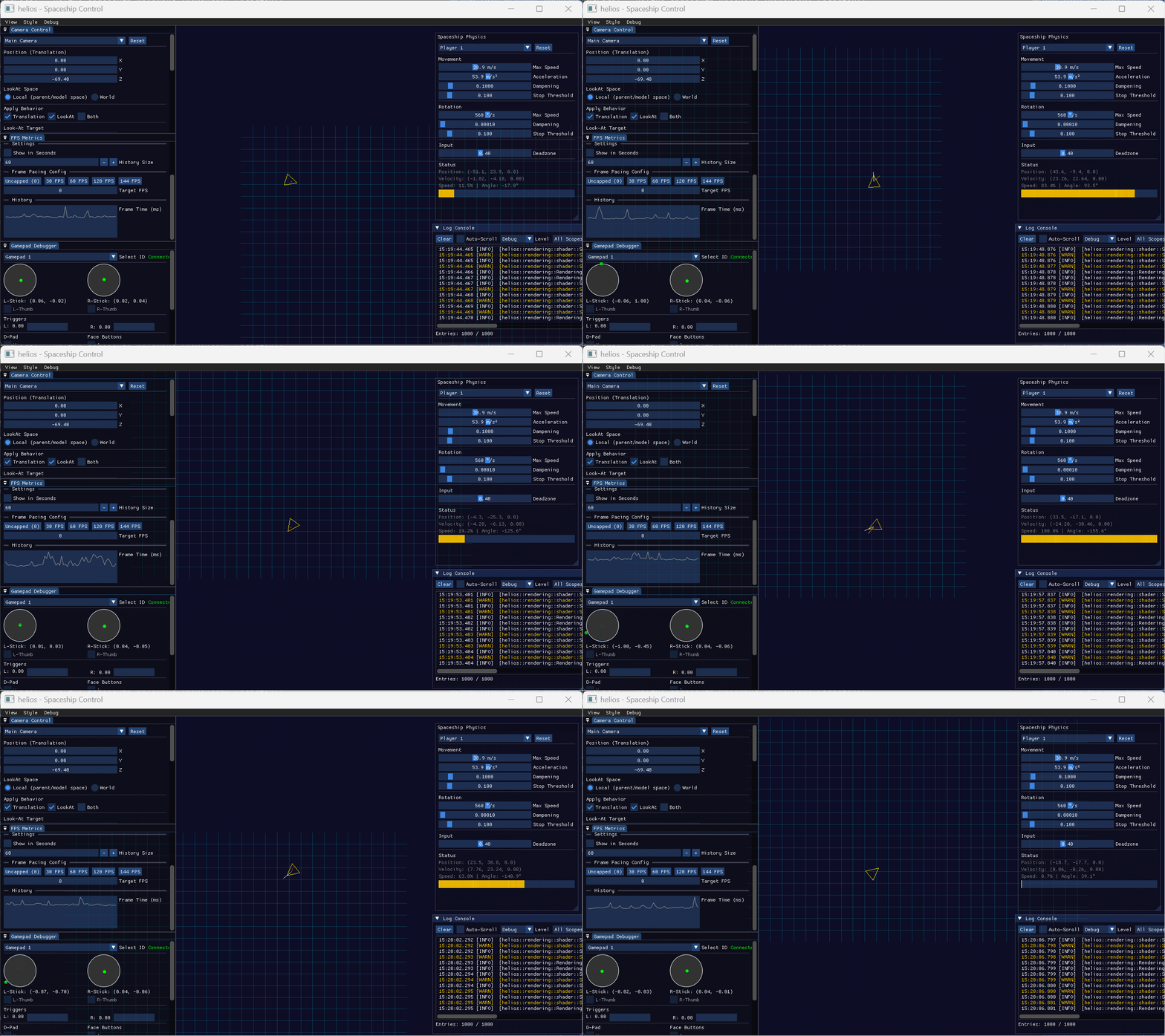
The spaceship_control example brings everything together: a small spaceship you fly with gamepad, a camera parented to the ship that inherits only translation (so it follows position but stays level when the ship rotates), and the ImGui overlay for tweaking things live.
Input flows through InputSnapshot, the handler creates movement commands, and the CommandBuffer executes them each frame. It’s more architecture than a demo strictly needs, but it validates that the systems work together. And flying the spaceship around is genuinely fun.
Breaking Changes
If you’re coming from milestone_1, a few things moved around:
- Cameras:
CameraSceneNodenow wrapsCamera, not the other way around. Viewport usessetCameraSceneNode(). - Enum sentinels: Renamed from
COUNTtosize_everywhere for consistency. - MeshData: Merged into
Mesh. - Material: Now owns shader and properties via shared_ptr.
The camera change is the disruptive one, but the component-wise transform inheritance makes the migration worth it.
Next
The scene graph works the way I want now, input handling is solid, and I have debug tools that save time. The obvious gap is that everything still looks like colored shapes. Next milestone will focus on shooting bullets and basic collision detection, so the ship doesn’t leave the arena.
Pre-built binaries can be found here if you want to try the examples.
Usage of Copilot in this Milestone
Code Generation
I ended up spending more time on debug widgets than I originally planned, but having good tools makes everything else faster. I saw this as a good opportunity to try GitHub Copilot for code generation, so I gave it a shot for the ImGui widgets after I implemented the basic ImGui-related API.
Copilot generated boilerplate code for the widgets based on my comments and function signatures, which saved me a lot of typing. I still had to tweak the generated code to fit my architecture and style to some extent, but it was a helpful starting point and impressive to see how far models like Claude Opus 4.5 have come.
Code Review
As a solo dev, I’ve also come to appreciate GitHub’s Copilot code review. No colleagues to catch my mistakes, but at least I get a second pair of “eyes” on pull requests before merging.
Manifesto for AI-Augmented Software Craftsmanship
As I have stated in a previous post, it is important to me that I understand what I’m building. Using AI tools for boilerplate generation and code review helps me focus on the architecture and design decisions, while still ensuring that I grasp the underlying concepts. To add transparency to my use of AI tools, I have documented my approach in The Manifesto for AI-Augmented Software Craftsmanship, which I also discussed in more detail here.
Leave a comment
Log in with itch.io to leave a comment.